How to View Your Trial Balance in FreeAgent (Step-by-Step Guide)
Find your FreeAgent trial balance, choose the right reporting date, investigate sales and other account balances, and export the figures for review.
By In Front Accounting · Published 22 October 2026
The short answer
- Log in, then go to Accounting > Reports > Detailed > Trial Balance.
- Select the relevant As at [date] year-end in the Date dropdown, or use a custom date range where appropriate.
- Open a blue account link or balance to inspect Show Transactions; use Export Report for CSV downloads.
What is a trial balance?
A trial balance lists the balances on your bookkeeping accounts, such as sales, expenses, bank accounts and liabilities, in debit and credit columns. It is a useful starting point for checking your records, not proof that every transaction is correct. If you need help reviewing the figures, our FreeAgent accountants support businesses in Essex and across the UK.
Step by step: view your FreeAgent trial balance
- Log in to FreeAgent. Open the correct business account, particularly if you have access to more than one business. If reports are unavailable, ask your account administrator to check your access level.
- Open Accounting > Reports. Select Accounting in the main navigation, then Reports.
- Choose Trial Balance. Look under the Detailed reports section and select Trial Balance.
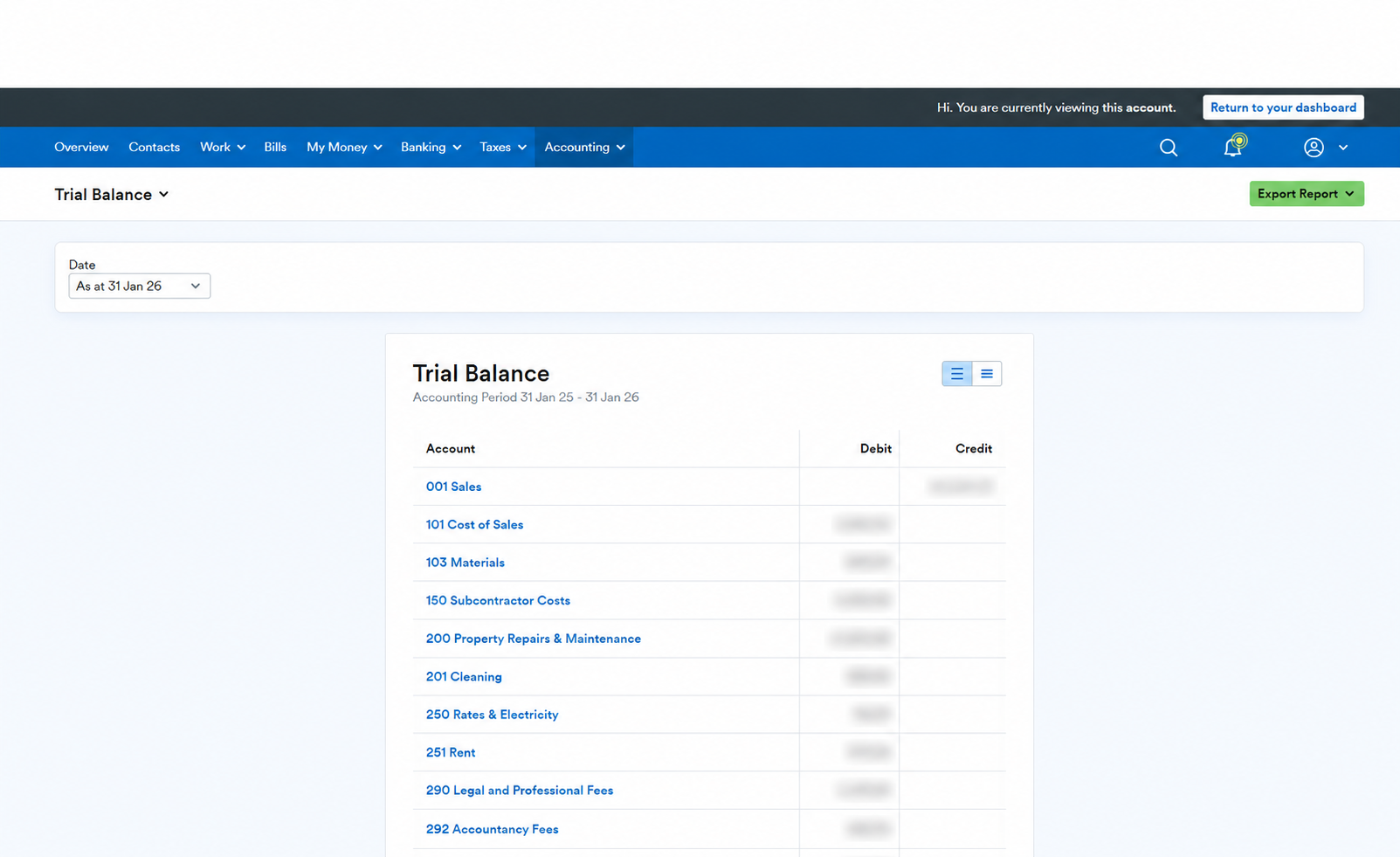
- Choose the right reporting date. In the Date dropdown, choose the latest relevant financial year-end labelled As at [date]. Use the year-end you are actually reviewing, rather than automatically choosing today's date. For a specific period, select Custom date range, enter the From and To dates, then select Show this range. A custom range shows transactions within that period without brought-forward balances, so it is not the same as an as-at balance.
- Read the account rows and debit/credit columns. Each row identifies an account category and its balance for the selected report. Assets and expenses commonly have debit balances; income, liabilities and equity commonly have credit balances, although adjustments can change that. Debit does not simply mean money out, and credit does not simply mean money in. Matching totals do not rule out miscategorised or duplicated entries.
- Investigate the sales or account breakdown. Click the blue account category link, for example 001 Sales, to see the transaction-by-transaction breakdown in Show Transactions. In some report views, the clickable balance figure opens this report instead. Follow a linked transaction to inspect its original entry where available, checking its date, description and category before making any changes.
- Export the report. Open Export Report and choose Summary CSV for account-level balances or Transactions CSV for the underlying transaction detail, where these options appear in your report view. Check the selected date before downloading, and share financial data securely. A separate Chart of Accounts CSV is a list of account categories, not a substitute for a trial balance export.
Trial balance screenshot
How to check your sales breakdown
Open 001 Sales or its linked figure, then review the Show Transactions rows behind the total. Compare the same date range with your invoices and investigate missing, duplicated or incorrectly categorised entries. Sales are not necessarily the same as money received into your bank: an invoice and its later payment are different parts of the bookkeeping. Our FreeAgent invoice and payment tutorial explains how they connect.
Troubleshooting: why do the figures look different?
- Check the accounting year and date. Compare like-for-like reports at the same date. Do not change your business's year-end just to make a report match. FreeAgent recommends splitting a custom range into two reports if it crosses an accounting year-end.
- Check as-at versus custom-range reporting. A period-only report excludes brought-forward balances. That can explain a difference from a year-end trial balance.
- Reconcile before relying on the figures. Explain and review bank transactions, compare bank balances with statements at the same date, and check missing invoices, bills and duplicates. Follow our FreeAgent bank reconciliation guide.
- Allow for adjustments. Opening balances, journals, accruals and later corrections can change the report. Ask your accountant about differences from final accounts rather than deleting entries or posting a balancing adjustment without understanding it.
- Check the report view. Menu names and clickable links can vary with your account and software updates. FreeAgent's official Trial Balance and Show Transactions guides are linked below.
For more practical checks, read our common FreeAgent mistakes guide. Review any unexplained differences before using the report for year-end accounts or tax work.
Free: 2026/27 Tax Deadline Calendar
Every key HMRC date for the tax year — self-assessment, corporation tax, VAT, payroll, and more. Sent straight to your inbox as a PDF.
No spam. Unsubscribe anytime.
Need a FreeAgent accountant to check your figures?
Our FreeAgent accountants in Essex and Brentwood offer bookkeeping reviews and accounting support, with remote help nationwide across the UK. Contact In Front Accounting to discuss the support your business needs.
Related Articles
Common Questions
Where is the trial balance in FreeAgent?
Log in and select Accounting > Reports. Under Detailed, choose Trial Balance, then choose the appropriate reporting date from the Date dropdown.
How do I view the sales breakdown in FreeAgent?
In the trial balance, click the blue 001 Sales account category link or its linked balance figure to open Show Transactions. Review the individual rows and follow a linked transaction to its original entry where available.
Can I export my FreeAgent trial balance?
Yes. Use Export Report and choose Summary CSV for account-level figures or Transactions CSV for transaction detail where offered. Check the date first. A Chart of Accounts CSV is a different export containing categories rather than trial balance figures.
Why do my trial balance figures differ from another report?
Check that both reports cover the same accounting year and reporting date. A custom date range excludes brought-forward balances. Missing or duplicated transactions, opening balances, journals and later adjustments can also explain differences. Reconcile your records and ask your accountant about unresolved differences.
Last reviewed 22 October 2026. Steps follow FreeAgent's own help articles at the time of writing; menu names and access levels can change. Sources: FreeAgent: Trial Balance report, FreeAgent: Show Transactions report, FreeAgent: export a chart of accounts. General guidance, not advice on your specific circumstances.